How to Fix Stringing and Oozing in 3D Prints
Stringing is the cobweb of thin plastic hairs that you find between two parts of a print, or across an open gap. It does not usually harm strength, but it looks messy and it can ruin small details. It happens when plastic leaks out of the nozzle while the nozzle moves without printing. Reduce the leaking, or reduce those moves, and the hairs disappear.
What is happening
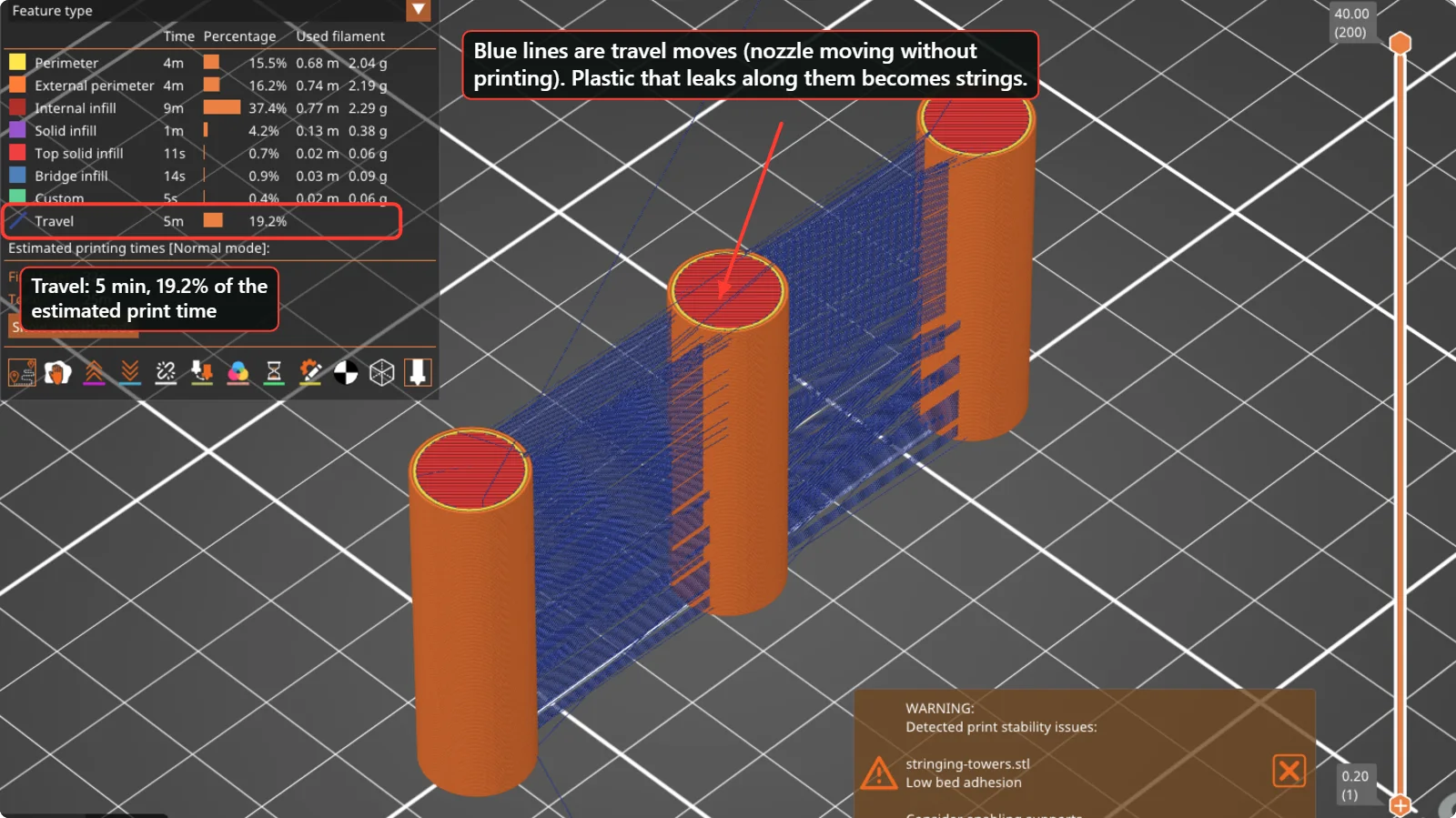
A hot nozzle is full of molten plastic. When the printer moves from one part of a layer to another without extruding (a “travel move”), pressure inside the nozzle can still push out a thread. Anything that lowers the pressure or the temperature, or shortens the travel, helps. The slicer’s preview shows these travel moves as thin lines. In the picture above, three towers 35 mm apart are joined by a web of blue travel lines; in this preview they take 5 minutes, 19.2 % of the estimated print time.
Check in this order
1. Dry the filament
Plastic that has absorbed moisture bubbles in the nozzle, makes popping sounds, looks rough and strings almost everywhere, no matter how you tune the settings. If a new setting does not help, dry the spool before you change anything else. Follow the drying time and temperature given by your filament maker, and store opened spools in a sealed box with desiccant.
2. Lower the nozzle temperature
A hotter nozzle makes thinner, runnier plastic. Lower the temperature in steps of 5 °C and print a small test each time. The profiles we looked at use 230 °C for the first layer and 225 °C afterwards for Prusament PLA Blend, and 220 °C for Bambu PLA Basic, which lists a recommended range of 190 to 240 °C. Do not go below the range printed on the spool.

3. Tune retraction
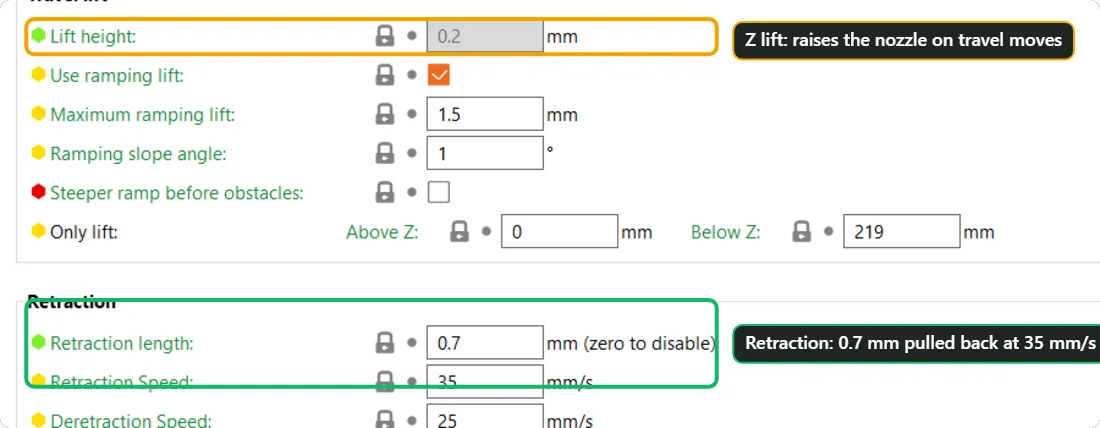
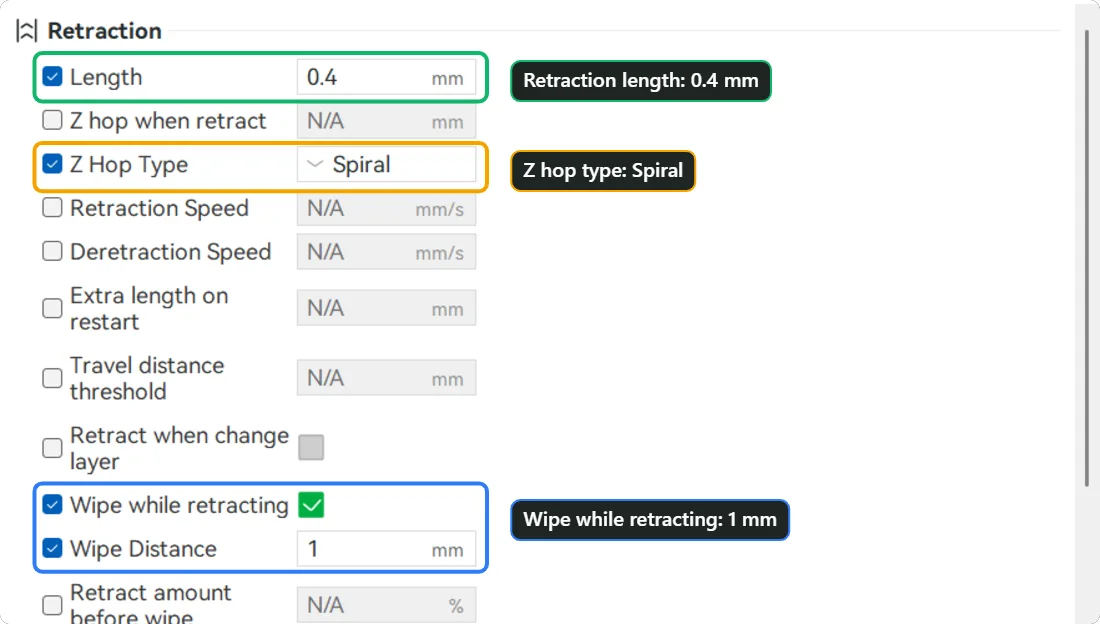
Retraction pulls the filament back a little before a travel move, to release the pressure, and pushes it forward again afterwards. PrusaSlicer’s MK4S profile retracts 0.7 mm at 35 mm/s. Bambu Studio’s A2L profile retracts 0.4 mm and also “wipes” 1 mm of the nozzle path while retracting, and lifts the nozzle with a spiral Z hop. These numbers fit those printers. A printer with a long tube between the extruder and the hotend needs far more retraction than a direct-drive printer, so start from your own profile and change one value at a time.
Very high retraction does not fix stringing. Too much retraction pulls molten plastic up the nozzle and can cause clogs and gaps. Increase in small steps, and stop when the result stops improving.
4. Shorten the travel
Fewer and shorter travel moves mean fewer strings. Move parts closer together on the plate, avoid printing many tiny separate islands in one layer, and use the slicer option that stops the nozzle crossing the outer wall of the part (“Avoid crossing perimeters” in PrusaSlicer, “Avoid crossing wall” in Bambu Studio and OrcaSlicer). Strings inside the part are hidden by the wall; strings across open air are the ones you see.
5. Print a small test, not the whole model
To tune stringing, print two or three thin towers, about 30 to 40 mm apart. They take a few minutes and show the result clearly. Change one thing between tests and write the value down.
What to change, and the usual effect
| Change | Helps against | Side effect if you overdo it |
|---|---|---|
| Dry the filament | Strings and rough surface everywhere | None |
| Lower nozzle temperature by 5 °C | Runny plastic | Weak layers, under-extrusion |
| Increase retraction a little | Strings after travel moves | Clogs, gaps in the print |
| Faster travel speed | Less time to leak | More vibration, ghosting on some printers |
| Avoid crossing walls | Strings on visible faces | Slightly longer paths |
Use the slicer’s own test models
OrcaSlicer has a Calibration menu with built-in tests, including a temperature tower and a retraction tower, which print the same shape with a different setting at each height. You can read off the best value from the finished part. Bambu Studio and PrusaSlicer users can print the same kind of tower with the free test models from the community. Print one setting at a time, and write down the number that gave the cleanest result.
If nothing helps
- Check that the nozzle is clean and not partly clogged. A partly blocked nozzle leaks and drags plastic.
- Check the hotend cooling fan, so that heat does not creep up the nozzle during long pauses.
- Try another spool of the same material. If it prints clean, the first spool is the problem.
- Compare with the printer maker’s default profile, and change back anything you changed.
Questions people ask
Why does PETG string more than PLA?
PETG is stickier and stays runny over a wider temperature range, so it leaks more easily. Dry it well, use a slightly lower temperature, and tune retraction carefully.
Is stringing a sign of a broken printer?
Usually not. It is almost always wet filament, a high temperature or too much travel. Fix those before you touch the hardware.
Can I turn travel moves off?
No, but you can reduce them. Keep parts close together and use the avoid-crossing option.
Keep reading
 3D Print Not Sticking to the Bed? 7 Fixes for First-Layer AdhesionWhy a 3D print lifts, slides or never sticks to the build plate, and the order in which to check it: clean plate, first-layer height, bed temperature, brim, fan, speed and part orientation, with real slicer screenshots.
 Why Is My 3D Print Taking So Long? Measured Effect of Infill, Walls and Layer HeightWe sliced the same 60 mm cube ten ways in PrusaSlicer and recorded the estimated print time and plastic use. See which settings change the time, and which ones barely matter.
 3D Printing Glossary: The Terms Used in Our GuidesPlain-language definitions of 3D printing terms: bed, perimeter, infill, layer height, slicer, bridging, supports, brim, clearance, STL, 3MF, dovetail, diffuser and more.
Written and checked by the Volucore team against the behaviour of our tools. Spotted a mistake or something out of date? Tell us and we will fix it.